Hi, Trent here. If you’re on the CoveyFi waitlist, thank you. You’ve probably already had the moment we built this for: the confusing bill on the kitchen table, the charge nobody recognizes, the quiet worry that something is slipping through and you won’t know until it’s too late. And if you’re new here, welcome. This is a look at what we’ve been building.
We’ve been heads-down for months. This post covers what CoveyFi does today, how it decides what’s worth your attention, and the principles we won’t bend on as we open the doors in the coming weeks.
Quiet is the feature
Most financial apps compete for your attention. CoveyFi is designed to need as little of it as possible.
When you connect your parent’s accounts, CoveyFi spends its first few weeks learning what normal looks like for their household: which bills arrive when, roughly what a typical month costs, where the money usually goes. After that, it only speaks up when the pattern changes.
On an ordinary week, that means a short summary and nothing else. “Everything looks on track this week” is the message we hope you see most. It’s not a line-by-line list of what your parent bought. It’s the smoke detector sitting quietly in the corner, letting you get on with your week.
Speaks up when something’s off
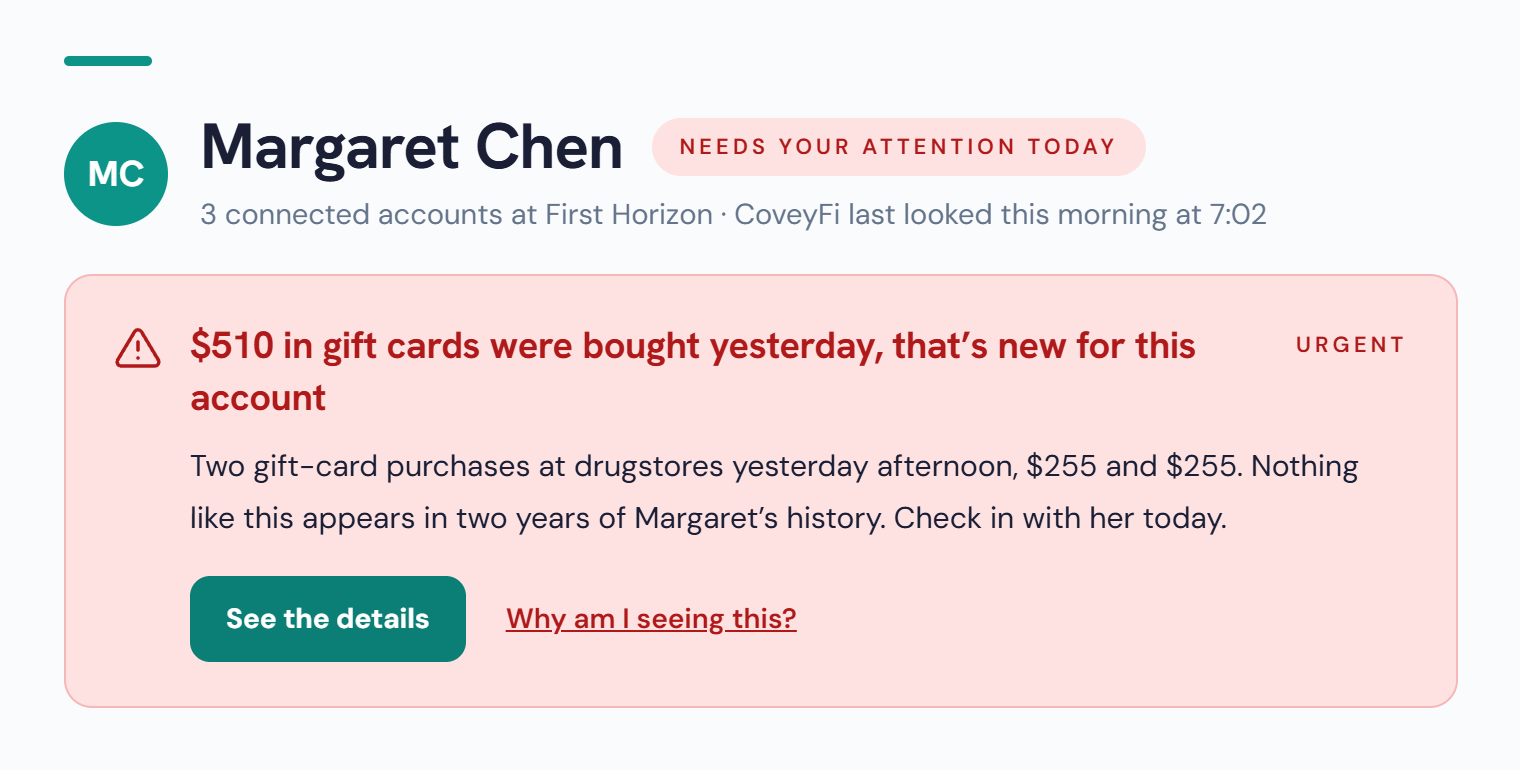
When something does change, we want you to understand it in one read. Every heads-up follows the same shape: what happened, why it stands out for this account, and what to do next.
A few things we got deliberate about:
- It says it plainly. “$510 in gift cards were bought yesterday, that’s new for this account.” No codes, no scores, no jargon.
- It explains why. Every heads-up has a “Why am I seeing this?” link that shows the pattern it compared against, so you’re never asked to trust a black box.
- It matches the moment. Most changes are a calm “worth a look.” Only the rare, time-sensitive ones say “needs your attention today.” If everything is urgent, nothing is.
- It points to a conversation. The suggested next step is almost always to check in with your parent. CoveyFi gives you the starting point, not a verdict.
The warning signs we look for automatically
You shouldn’t have to know every warning sign to catch one early. From the day you connect, CoveyFi watches for the patterns that show up again and again in elder financial exploitation:
- Gift-card purchases that don’t fit the account’s history, one of the most common ways fraudsters ask to be paid.
- Large or unusual transfers, especially to someone new.
- New recurring charges that quietly start appearing every month, the “slow leak” that’s easy to miss.
- Missed or changed bills, when something that always arrives on time doesn’t.
These are a starting set, not a finished list. We’ll keep adding to them as we learn from the families using CoveyFi. If you want the background, our guide to how exploitation happens quietly covers the patterns in more depth.
Rules your family sets, in plain language
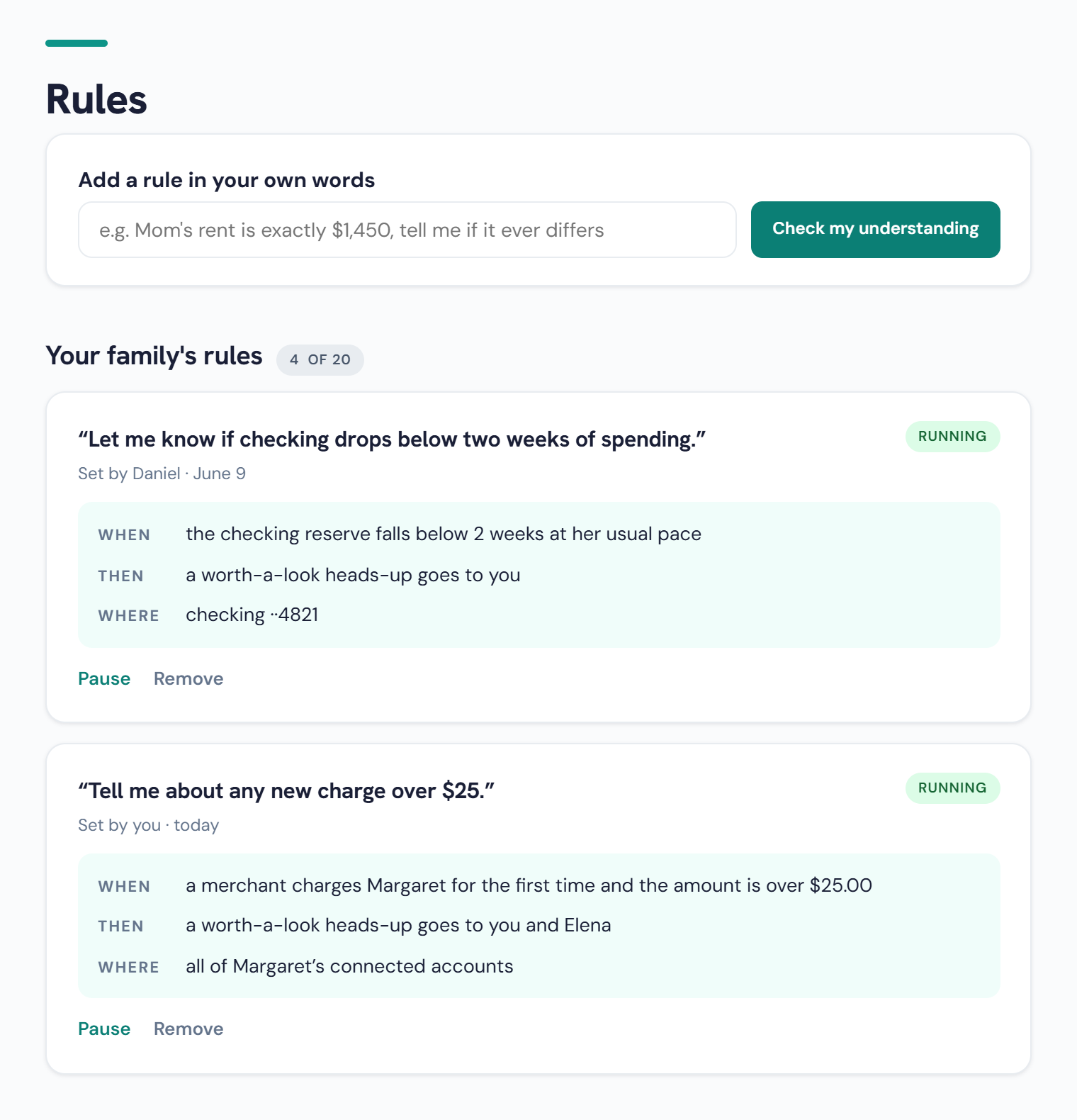
Every family knows things no algorithm can. Mom’s rent is exactly $1,450. Dad should never have less than two weeks of spending in checking. So we made it possible to tell CoveyFi those things the way you’d say them out loud.
Here’s how it works:
- Write it in your own words. “Tell me about any new charge over $25.”
- CoveyFi checks its understanding. Before anything runs, it repeats the rule back in three parts: when it applies, then who hears about it, and where, meaning which accounts it watches.
- You confirm, and it starts running. Pause it or remove it any time.
Rules are shared across the family. You can see who set each one and when, and send a heads-up to a sibling as well as yourself. Everyone who helps gets the same picture, with no shared passwords and no one quietly checking statements on their own.
Your parent stays in charge
None of this works if your parent feels watched. So the foundations aren’t features you can toggle. They’re how CoveyFi is built:
We built CoveyFi to pass one test: if your parent read every screen over your shoulder, they’d feel cared for, not spied on.
What’s next, and how you can help
We’re opening the first group of accounts in the coming weeks, and everyone on the waitlist is in line. Between now and then, we’re refining how heads-ups are worded, adding to the warning signs CoveyFi watches for, and making family setup simple enough to do together at the kitchen table.
The most useful thing you can do is tell us about your situation. Who are you caring for? What keeps you up at night? I read every reply, and they shape what we build next.
Thank you for trusting us so early. It means more than you know.
P.S. Know someone else caring for a parent? Forward them this post. They can join the waitlist right from here.